CPU cooling has become a big topic in recent years. Modern CPUs are faster, smarter, and more power-hungry than ever. They boost aggressively, run hotter under load, and demand better cooling to perform at their best.
As someone who has tested both air coolers and liquid coolers across many CPU generations, I can say this clearly: cooling is not about chasing the lowest temperature — it’s about stable performance and acceptable noise.
Liquid cooling and air cooling both work well in 2025. The real question is which one suits your system and usage better.
Why Cooling Matters More Than Ever
Modern CPUs automatically push themselves until they hit thermal or power limits. Better cooling does not just reduce temperatures — it allows the CPU to maintain higher boost speeds for longer.
Poor cooling leads to:
- Performance throttling
- Loud fan noise
- Shorter component lifespan
- Uncomfortable system heat
Good cooling keeps the CPU stable, quiet, and consistent during long workloads.
How Air Cooling Works in Practice
Air coolers use a large metal heatsink and one or more fans to pull heat away from the CPU. The heat is then pushed into the case and exhausted by case fans.
High-quality air coolers have become very capable. Modern designs use large heat pipes, dense fins, and efficient fans.
In real-world testing, good air coolers handle most CPUs without trouble, even during gaming and productivity work.
Real-World Air Cooling Experience
Air cooling has a few clear strengths. It is simple, reliable, and easy to maintain. There are no pumps, no liquid, and fewer parts that can fail.
Noise levels depend on fan quality and airflow. A well-designed air cooler can be very quiet, especially at idle and moderate loads.
The main limitation appears with very high-power CPUs under sustained load. In those cases, air coolers may struggle to keep temperatures low without increasing fan noise.
How Liquid Cooling Works in Practice
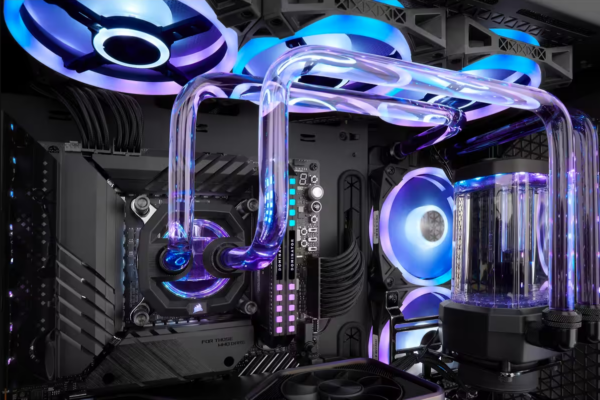
Liquid coolers move heat away from the CPU using liquid instead of air. A pump pushes liquid through a cold plate on the CPU and into a radiator, where fans remove the heat.
This design spreads heat over a larger surface area. Because of this, liquid coolers often perform better during heavy, sustained workloads.
Liquid cooling is especially popular in high-end builds and compact cases.
Real-World Liquid Cooling Experience
In testing, liquid coolers shine during long rendering, streaming, and stress testing. They handle heat spikes better and keep temperatures more stable.
Noise behavior is different from air cooling. While fans may spin slower, the pump adds a constant sound. Good liquid coolers manage this well, but cheaper ones can be noisy over time.
Liquid coolers also add complexity. Pumps can fail, and installation requires more care.
Cooling Performance Comparison
| Aspect | Air Cooling | Liquid Cooling |
|---|---|---|
| Installation | Simple | Moderate |
| Maintenance | Very low | Low to moderate |
| Cooling at Load | Good | Very good |
| Noise at Idle | Very quiet | Quiet |
| Noise at Load | Fan dependent | Fan + pump |
| Reliability | Excellent | Good |
| Lifespan | Long | Shorter |
| Cost | Lower | Higher |
Noise: The Hidden Factor
Many buyers assume liquid cooling is always quieter. This is not always true.
At idle, air coolers are often nearly silent. At load, large air coolers may become audible, but the sound is usually smooth and predictable.
Liquid coolers add pump noise, which some users find more noticeable than fan noise. High-quality models handle this well, but cheaper units often do not.
In quiet environments, air cooling can feel more natural.
Case Size and Airflow Matter
Cooling performance depends heavily on the case.
Large cases with good airflow favor air coolers. Compact cases benefit more from liquid cooling, especially front or top-mounted radiators.
In testing, even the best cooler struggles in a poorly ventilated case. Cooling solutions work best when paired with proper airflow.
Overclocking and Boost Behavior
For users who push CPUs hard, liquid cooling provides more thermal headroom. This allows CPUs to maintain higher boost clocks for longer.
Air coolers can still handle mild overclocking, but sustained heavy loads may push them close to their limits.
For stock usage and gaming, the difference is often small.
Reliability and Long-Term Use
Air coolers have fewer failure points. As long as the fan works, they keep going for years.
Liquid coolers rely on pumps, seals, and liquid quality. While modern units are reliable, they still have more parts that can wear out.
From a long-term testing perspective, air cooling wins in reliability.
Which Cooling Is Right for You?
Choose air cooling if:
- You want simplicity and reliability
- You value quiet operation
- You use your PC mainly for gaming
- You prefer lower cost
Choose liquid cooling if:
- You run heavy workloads for long hours
- You use a high-power CPU
- You have a compact case
- You want cleaner aesthetics
The Final Word from Real Testing
Liquid cooling is not automatically better. Air cooling is not outdated. In 2025, both are mature and effective solutions.
For most users, a good air cooler offers excellent performance with less noise, lower cost, and higher reliability. Liquid cooling makes sense for high-end CPUs, heavy workloads, and space-limited builds.
The best cooler is the one that fits your CPU, case, and usage, not the one with the most marketing hype.