When people build a PC, the motherboard is often chosen last. Many buyers simply check the chipset name, look at the price, and move on. As a hardware tester who has built, tested, and stress-tested dozens of systems, I can say this clearly: the motherboard decides how stable and long-lasting your PC will be.
Two boards with the same chipset can behave very differently in real-world use. One stays cool and stable. The other throttles, crashes, or ages badly. The difference is not marketing — it’s what’s under the hood.
Why the Chipset Alone Doesn’t Tell the Full Story
The chipset mainly decides feature support: CPU compatibility, PCIe version, USB support, and basic connectivity. That’s important, but it’s only the starting point.
In testing labs, we see budget and premium motherboards using the same chipset, yet performing very differently under load. This happens because real performance depends on power delivery, cooling, layout, and component quality.
VRMs: The Real Backbone of the Motherboard
If there is one thing hardware testers care about most, it is the VRM — the Voltage Regulator Module.
VRMs control how clean and stable the power is that goes to the CPU. Weak VRMs overheat easily, especially during gaming, rendering, or AI workloads.
In real testing, poor VRMs cause:
- CPU throttling
- Sudden performance drops
- Higher temperatures
- Shorter component life
A strong VRM setup keeps the CPU stable even during long stress tests.
VRM Quality Comparison (Simplified)
| VRM Quality | Real-World Behavior |
|---|---|
| Weak VRMs | Throttling under load |
| Average VRMs | Fine for basic use |
| Strong VRMs | Stable under heavy work |
| High-End VRMs | Overclocking ready |
Power Delivery Matters More Than Overclocking
Even if you never plan to overclock, good power delivery matters. Modern CPUs boost automatically, and they rely heavily on stable power.
In our testing, CPUs on better motherboards maintain higher boost clocks for longer periods — without touching any settings.
This means better performance even at stock speeds.
Cooling Design: Heatsinks Are Not Decoration
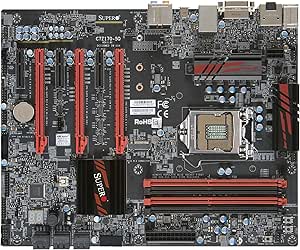
Large heatsinks around the CPU socket are not just for looks. They cool the VRMs and prevent overheating.
Boards with small or poorly designed heatsinks often pass short tests but fail long gaming or rendering sessions. As a tester, this is one of the first things we notice.
Airflow matters too. A well-designed board works better even with simple case cooling.
Memory Support and Stability
Motherboards play a huge role in RAM stability. Faster RAM is only useful if the motherboard can run it reliably.
In testing, cheaper boards often struggle with high-speed RAM, causing random crashes or forcing lower speeds.
A good motherboard makes RAM tuning easier and more stable, even without manual tweaking.
Expansion Slots and Layout: Practical, Not Fancy
From a tester’s view, layout matters more than looks. Poor slot placement can block airflow or make upgrades difficult.
Things we always check:
- GPU slot reinforcement
- Spacing between PCIe slots
- Easy access to storage ports
- Clear CPU cooler compatibility
Good layout improves airflow, upgrades, and cable management.
Storage Support: More Than Just “Has NVMe”
Many boards claim fast storage support, but not all NVMe slots are equal. Some share bandwidth, others disable ports when in use.
In real testing, poor storage layout leads to slower speeds or upgrade limits later.
Storage Feature Comparison
| Feature | Budget Boards | Better Boards |
|---|---|---|
| NVMe Slots | Limited | Multiple |
| Heat Spreaders | Rare | Common |
| Bandwidth Sharing | High | Minimal |
| Upgrade Flexibility | Low | High |
Connectivity and I/O: Daily Convenience
Rear I/O is something users notice every day. Cheap boards often cut corners here.
As testers, we value:
- Reliable USB ports
- Stable network controllers
- Good audio quality
These don’t improve benchmarks, but they improve daily experience.
BIOS Quality and Updates
A motherboard’s BIOS decides how easy it is to use and update. In testing, boards with poor BIOS support often create long-term issues.
Good BIOS support means:
- Faster boot times
- Better compatibility
- Longer CPU support
- Easier troubleshooting
This matters more than many buyers realize.
Simple Comparison Table: What Actually Matters
| Feature | Why It Matters |
|---|---|
| VRM Quality | Stable CPU performance |
| Power Delivery | Better boost behavior |
| Cooling Design | Prevents throttling |
| RAM Stability | Fewer crashes |
| Slot Layout | Easy upgrades |
| Storage Design | Long-term flexibility |
| BIOS Support | Future compatibility |
| Build Quality | Longer lifespan |
The Hardware Tester’s Final Thoughts
As a hardware tester, I can confidently say this: the motherboard decides how well all other parts behave. A good CPU and GPU cannot shine on a weak board.
You don’t need the most expensive motherboard. But you do need one that is electrically strong, thermally sound, and sensibly designed.
Look beyond the chipset. That’s where real quality lives.